


Troubleshooting FAQ: Why Your Smart Device Isn’t Working

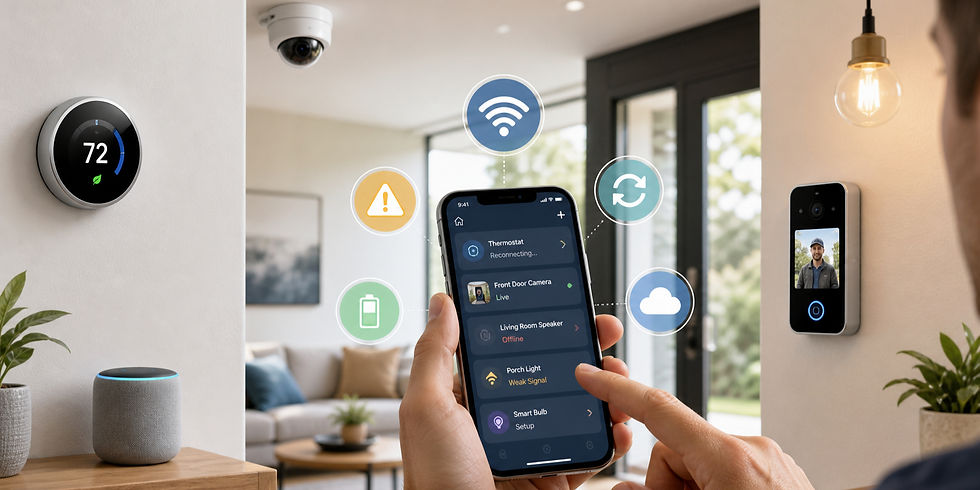
Smart home devices can make everyday life easier, but when something stops working, the frustration usually starts fast. A camera goes offline. A thermostat will not reconnect. A smart lock disappears from the app. A device that worked perfectly yesterday suddenly refuses to cooperate.
The good news is that many smart home issues come down to a few common causes. In many cases, the problem is not the device itself. It is the Wi-Fi connection, app communication, power source, software, or setup environment.
Here is a practical FAQ guide to some of the most common smart home device problems and what may be causing them.
Why won’t my smart home device connect to its app?
This is one of the most common smart home complaints, and it usually comes down to a communication issue between the device, the phone, and the network.
Possible reasons include:
The app needs to be updated
The device is not in pairing mode
Your phone is not connected to the correct Wi-Fi network
Bluetooth permissions are off
The device was previously paired and needs to be reset
The manufacturer’s cloud service is temporarily down
In many cases, restarting the app, confirming login credentials, and resetting the device into pairing mode can solve the issue. It also helps to check whether the app requires Bluetooth during setup, even if the device will ultimately run on Wi-Fi.
Why won’t my smart device connect to Wi-Fi?
Wi-Fi connection problems are one of the biggest reasons smart devices fail during setup.
Common causes include:
The device only supports 2.4 GHz Wi-Fi, not 5 GHz
The Wi-Fi password was entered incorrectly
The router security settings are incompatible
The signal is too weak where the device is installed
The network name includes unusual symbols the device struggles with
Too many devices are already connected to the network
Many smart home devices, especially smaller sensors, plugs, cameras, and garage modules, are designed for 2.4 GHz networks only. If your phone is on a 5 GHz network during setup, the device may fail to connect or complete pairing properly.
Why did my smart home device stop working after it was working fine before?
When a smart device suddenly stops working, the cause is often something external rather than a total device failure.
Possible explanations include:
A power outage or brief interruption
A router reboot or internet outage
A firmware update that did not complete correctly
Weakening Wi-Fi signal over time
Battery drain
App changes or account sync issues
The device lost connection to its hub or bridge
Sometimes the device is still powered on but is no longer properly connected to the app or network. A restart of the device, router, and app often helps identify whether the issue is local or system-wide.
Why does my smart device say it is offline?
An “offline” message usually means the device cannot communicate with your network, its app, or its cloud service.
This can happen when:
The internet is down
The router is online, but the device lost Wi-Fi
The device has low power
The hub is unplugged or disconnected
The app is having trouble syncing with the cloud
The device needs to be restarted
If multiple devices show as offline at once, the issue is often your network rather than the devices themselves. If only one device is offline, it is more likely a signal, power, or hardware issue in that location.
Why does my smart home device have a low Wi-Fi signal?
Low signal strength is one of the most common hidden causes of unreliable performance.
Possible reasons include:
The device is too far from the router
There are thick walls, tile, concrete, or metal between the router and device
The device is installed outdoors or in a garage
Large appliances or electronics are causing interference
The router is placed in a poor central location
The network is overloaded
A device with weak signal may still appear connected, but it may disconnect often, respond slowly, or fail to update status accurately. This is especially common with outdoor cameras, video doorbells, garage controllers, and smart locks.
Why is my smart camera buffering, lagging, or disconnecting?
Smart cameras use more bandwidth than many other devices, so they tend to show connection problems more clearly.
Common causes include:
Weak Wi-Fi signal
Too much distance from the router
Slow internet upload speeds
Network congestion
Too many active streaming devices at once
Camera firmware that needs updating
If a camera works sometimes but freezes, drops offline, or shows delayed video, the problem is often signal strength or bandwidth rather than the camera itself.
Why won’t my smart thermostat connect?
Smart thermostats can fail to connect for the same reasons as other devices, but they may also have HVAC-related issues.
Possible causes include:
Weak or unstable Wi-Fi
Incorrect app setup
Power issues from the HVAC system
Improper wiring
Loss of common wire power
Router or account sync problems
If the thermostat screen is blank or unresponsive, the issue may not be Wi-Fi at all. It may be related to the HVAC power supply, breaker, or wiring.
Why won’t my smart lock, garage door opener, or doorbell stay connected?
These devices are often installed at the edge of the home, which makes them more vulnerable to signal issues.
Common reasons include:
Weak Wi-Fi near the door or garage
Low battery power
Interference from walls, metal doors, or exterior materials
Improper setup with the app
Hub or bridge communication problems
Entry devices often work best when supported by strong nearby Wi-Fi or a compatible hub placed within better range.
Why is my smart device not responding to commands?
If the device appears online but will not respond, the issue may be delayed communication rather than total disconnection.
Possible causes include:
App lag
Wi-Fi congestion
Hub communication problems
Cloud service interruptions
Firmware issues
Voice assistant sync delays
Sometimes the device is technically connected but not responding reliably because the command is getting delayed somewhere between the app, router, cloud system, and device.
Why does my device keep disconnecting and reconnecting?
Repeated drop-offs usually point to instability rather than complete failure.
This may happen because of:
Weak signal
Intermittent power
Router overload
Wi-Fi interference
Outdated firmware
Overheating
Device hardware beginning to fail
If the problem happens at certain times of day, heavy network traffic or interference may be contributing.
Why won’t my smart home hub find the device?
Some smart devices rely on a hub, bridge, or controller instead of connecting directly to Wi-Fi.
If the hub cannot find the device, it could be because:
The device is not in pairing mode
The battery is low
The device is too far from the hub
Another hub already paired with it
The hub firmware is outdated
The app is trying to add it to the wrong home or room
This is especially common with sensors, locks, shades, and devices using Zigbee, Z-Wave, or proprietary systems.
Why did my smart home device stop working after I changed routers or internet service?
A new router often creates problems for existing smart home systems because the devices still remember the old network.
Possible issues include:
The Wi-Fi name or password changed
The new router combines bands differently
Devices need to be re-added manually
IP or security settings changed
Hubs did not reconnect automatically
Some devices reconnect easily if the new network uses the exact same Wi-Fi name and password as the old one. Others need to be reset and re-paired.
Why is my smart device draining batteries too quickly?
Battery-powered smart devices usually consume more power when they are struggling to stay connected.
Possible reasons include:
Weak Wi-Fi or hub signal
Frequent motion triggers
Excessive notifications or wake-ups
Cold or hot environmental conditions
Old batteries
Firmware issues
A battery device with poor signal often works harder to maintain communication, which can shorten battery life significantly.
Why won’t my voice assistant control the device anymore?
Sometimes the device works in its native app but stops responding through Alexa, Google Home, or another assistant.
Possible reasons include:
The smart home skill or integration disconnected
Account linking expired
The device name changed
The device was moved to a different room or home
Cloud sync failed
The voice assistant app needs refreshing
This is often an integration issue rather than a device failure.
Why does my smart device need to be reset?
A reset is often needed when the device gets stuck between old and new settings.
This may happen after:
Failed setup attempts
Router changes
Account changes
Firmware glitches
Partial pairing with the app
Long periods offline
A factory reset gives the device a clean starting point, but it should usually be one of the later steps, not the first.
What should I check first when a smart home device stops working?
Before assuming the device is broken, it helps to start with the basics:
Confirm the device has power
Check whether the internet is working
Make sure the app is updated
Confirm your phone is on the right network
Check for low batteries
Restart the device
Restart the router
Look for service outages from the device manufacturer
A lot of smart home troubleshooting comes down to ruling out the simplest causes first.
When is the issue not the device at all?
Sometimes the real problem is not the device, but the environment around it.
That can include:
Poor Wi-Fi coverage
Internet instability
Power fluctuations
Improper placement
App issues
Account syncing problems
Too many devices competing on the network
In many homes, what looks like a device failure is really a network design issue.
Smart home devices can fail for a lot of reasons, but most problems fall into a few familiar categories: Wi-Fi issues, app setup problems, low signal strength, power interruptions, outdated firmware, or device placement.
The key is to troubleshoot calmly and systematically. Check power first. Then network. Then app settings. Then the device itself.
In many cases, the fix is simpler than it first appears.
And when the same problems keep happening, it may be a sign that the home’s network coverage, device placement, or overall smart home setup needs improvement.
At Naples Smart Home Watch we install smart home monitoring systems in Naples and the surrounding areas that help homeowners remotely track leaks, temperature, humidity, cameras, entry activity, and critical home conditions while home or away. Ready to protect your home? Schedule your free consultation today.


Comments